layman-script
for how to use for how it works
How to use
clone from github
$ git clone https://github.com/geooot/layman-script.gitcd into layman-script
$ cd layman-scriptrun the REPL
$ ./layman.shlayman.bat$ python3 main.pyor
or
Dependencies
python 3.x (for REPL)
run using a text file
$ python3 main.py -f "pathtotext.txt"What is layman-script?
layman-script /ˈlāmən skript/
A crude, non-domain specific English language parser.
It can parse English at a “level 1” reading level.
- Successfully interpret assertions and questions
- Create objects based on subjects and their verbs
-
Allow for advanced programming features to be included in parsing
- Boolean and equality operations
- Inheritance and encapsulation
Project Scope
Project Scope - What I accomplished
- Successfully interpret assertions and questions
- Create objects based on subjects and their verbs
-
Allow for
advanced programming featuresto be included in parsing- Boolean and equality operations (Kinda with does questions)
Inheritance and encapsulation
Parsing English is hard. So how do you do it?
You use Natural Language Processing.
Definition
Natural Language Processing
A field of computer science, artificial intelligence, and computational linguistics concerned with the interactions between computers and human (natural) languages. As such, NLP is related to the area of human–computer interaction.
- Wikipedia
Let's parse
Check out the example.
Mr. Bill went to the store.
Step 1: Tokenization
Step 1: Tokenization
Mr. Bill went to the store.
Tokenization is the processing of splitting up a group of text.
ex) Paragraph -> Sentences, Sentences -> words.
It’s pretty simple as it essentially converting a sentence to words using a simple split() function.
But it’s not that simple
Step 1: Tokenization
For example if this is in a paragraph and you're splitting to sentences by ending punctuation. This sentence...
Mr. Bill went to the store.
Will split into this...
[“Mr.”, “Bill went to the store.”]
Step 1: Tokenization
Also if you have one sentence and you split every word. You will get something like this.
[“Mr.”, “Bill”, “went”, “to”, “the”, “store.”]
However, when it is split like this, their is no correlation between the words. If you split by the word, finding the subjects is easier.
[“Mr. Bill”, “went”, “to”, “the store”]
Step: 2 Part Of Speech Tagging
Step 2: POS Tagging
The process of assigning the correct part of speech to each word in a sentence. While many more complicated methods to tag, at its basic level it needs a word list to compare against.
So I have a list of verbs, adverbs, prepositions to compare against. Then I will easily be able to correctly assign a POS to each word.
Right?
I wish...
Step 2: POS Tagging
(kinda ties to the main parsing)
Let’s take the example:
Mr. Bill went to the store.
After applying the POS tagger in its crude form:
(ORANGE= verb)
Mr. Bill went to the store.
Uh Oh! It counted Bill, and store as verbs even though they are the subject:
Step 2: POS Tagging
(kinda ties to the main parsing)
So currently this pass of tagging is very inaccurate, but it will do for now and it’s solution will be solved in the next step.
Step: 3 Finding Subject and Verb
(lexical analysis)
Step 3: Finding Subject and Verb
PREFACE: This could be way simpler if the tokenization in the beginning was done better.
Essentially we need to simplify the sentence to a SUBJECT VERB THING sentence.
George and Ansh like burritos --------> George likes burritos.
Ansh likes burritos.
Step 3: Finding Subject and Verb
But first we need to set some rules for what defines an assigning verb.
- The verb should follow after the subject or have it’s own subject associated with it.
- George ran to the pool
- The verb must not have an infinitive
- George likes to swim. ← Doesn’t count
- The verb can’t be in a list.
- George likes to swim, eat, and sleep.
Step 3: Finding Subject and Verb
Anything before the assigning verb can be assumed to be a Subject Phrase. And after it can be assumed to be the Noun Phrase.
Mr. Bill went to the store.
Here is an example of this in a more complicated scale. This is called Context-Free Grammar.
Source: Tutorials-Point
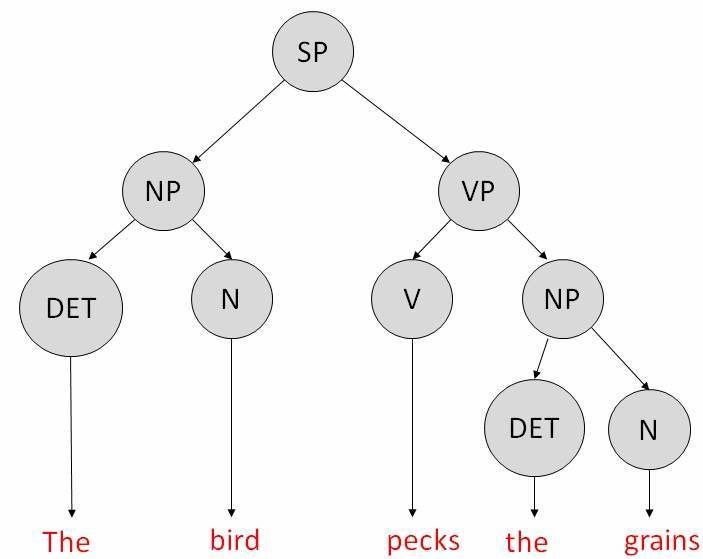
That's kinda the gist of how the parsing works.
Parsing questions are similar but can be separated by question types
Question Types
Crossed out types are not supported.
Who - Asking about an entry
What - Asking about actions.
When - Program has no instinct of time.
Where - Similar to When
Why - Program does not know the meaning of life
(Does) - Equivalent to a Boolean expression.
Hardships during development
The overall finished project did not fully meet the expectation from the beginning, but initial expectations were pretty unrealistic.
In general, completing the parser took the majority of the time and still is not that efficient.
If more time was available, I would spend more time on research and algorithm searching in order to code a more focused project.

